
Before you spend on Google Ads, your landing page has one job: help the right visitor understand the offer, trust the business, and take the next step without confusion. That sounds simple. It rarely is.
In 2026, Google’s landing page standards still center on a familiar idea: the destination must be functional, useful, easy to navigate, and honest about what the visitor will find. If the page feels unfinished, hides key details, or makes people work too hard, the ad spend can disappear before the page has a fair chance to convert.
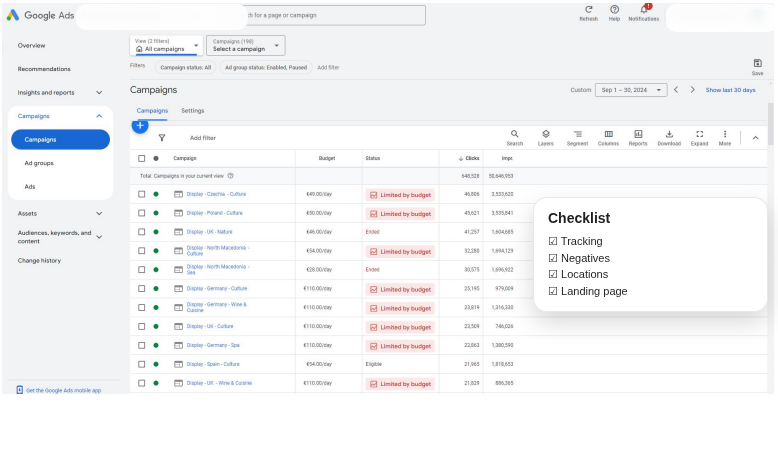
This guide walks through the practical checks I would want in place before sending paid traffic to a service page or dedicated landing page. It is written for business owners, marketers, and service teams who want fewer surprises after launch.
Why landing page readiness matters before running Google Ads
Google Ads can bring relevant visitors quickly, but traffic is not the same as progress. If the landing page is unclear, slow, or thin on trust signals, visitors tend to leave before they understand what is being offered. That can mean wasted budget, weak conversion rates, and a harder job for your ads team.
Google’s own guidance on landing pages and destination requirements emphasizes that pages should be useful and easy to navigate, with real value for the visitor. Google Search Central also says helpful content should be people-first, not written just to attract clicks. You can read those principles in the destination requirements help page and Google’s helpful content guidance.
For a service business, that usually means the page must answer three questions quickly: What is this? Why should I trust it? What should I do next?
Google’s current destination requirements: functional, useful, easy to navigate
Google does not want landing pages that look unfinished or make the user guess. The destination should work, load, and present the promised information. Pages that are under construction, broken, non-viewable, or difficult to use can create policy trouble and poor user experience at the same time.
That is why the safest approach is not to “trick” the policy. It is to build a page that would feel helpful even if no ad platform were involved.
- Functional: Forms, buttons, and links should work on the first click.
- Useful: The page should explain the offer clearly and provide enough detail to make a decision.
- Easy to navigate: Visitors should not feel trapped or forced to hunt for basic information.
If you are building from scratch, Google’s own guide to creating a website or landing page for ads is a helpful starting point.
The minimum trust signals users expect on a paid-traffic landing page
Paid traffic makes people cautious. They clicked an ad; they did not already know your business. A landing page needs enough proof points to feel real and safe.
Trust signals that matter most
- Clear branding: Use the same business name, logo, and tone that appear in the ad and in other parts of the site.
- Contact information: Offer a visible way to reach you, whether that is a contact form, email, phone number, or a contact page.
- Privacy policy link: Make it easy to find the privacy policy, especially if the page collects leads.
- Real service details: Show what is included, what is not, and who the service is for.
- Social proof: Use genuine testimonials, references, case studies, or portfolio links when available.
For service businesses, a references page can do quiet but important work. If you have one, link to it naturally from the landing page or supporting navigation. On this site, references and portfolio examples can support that trust layer well.
Technical checks: mobile usability, crawlability, speed, and browser compatibility
Many landing page problems are not visual at first glance. They show up when the page is opened on a phone, loaded on a slower connection, or visited in a different browser than the one you used to build it.
| Check | What good looks like | Why it matters |
|---|---|---|
| Mobile usability | Text is readable without zooming, buttons are easy to tap, and the page does not break on small screens. | Most paid traffic is likely to include mobile visitors. |
| Crawlability | The page can be accessed by search engines and does not block important assets or content. | Google needs to understand the page, especially if it also supports organic visibility. |
| Speed | Images are sized properly, scripts are trimmed, and the page loads fast enough to stay usable. | Slow pages can hurt conversions and increase drop-off. |
| Browser compatibility | The layout works in common browsers without missing elements or broken interactions. | Visitors arrive from many environments, not just your test laptop. |
If your site needs hosting improvements or a cleaner setup before traffic starts, it is worth reviewing the basics first. A stable foundation matters more than clever ad copy. The site’s hosting and domain information page is a useful place to check those service details.
Conversion essentials: one clear offer, one primary CTA, matched message
A landing page does not need to say everything. It needs to say the right thing clearly.
Start with one primary offer. If the ad promises Google Ads management, web design, or a landing page audit, the page should reflect that exact promise instead of drifting into ten other services. The page should also keep one primary call to action in focus.
- Match the ad to the page: If the ad says “Google Ads landing page review,” the page should say that too.
- Use one main CTA: “Request a review,” “Book a call,” or “Get a quote” is usually enough.
- Make contact options visible: A form is fine, but some visitors prefer an email address or contact page.
- Keep the story simple: Problem, solution, proof, next step.
For readers who want help shaping a service page around that structure, our web design services page explains the kind of layout and content planning that supports conversion. If the traffic goal is specifically advertising, the online advertising services page may be the better fit.
Common mistakes that trigger poor performance or policy issues
Most landing page failures are not dramatic. They are small frictions that add up.
- Misleading headlines: The ad promises one thing and the page delivers another.
- Too much navigation: A visitor gets lost before they get to the offer.
- Thin content: The page looks like a placeholder instead of a useful destination.
- Hidden contact details: People should not have to search for a real way to reach you.
- Ignoring mobile visitors: A page that works only on desktop is not ready for paid traffic.
- Overly aggressive pop-ups: They interrupt the visit before trust has a chance to form.
When Google’s destination requirements flag a page, the issue is often one of these basic problems: accessibility, usefulness, or consistency. That is why policy and conversion advice overlap so often. The page has to serve humans first.
A pre-launch checklist for small businesses and service websites
Before you spend on traffic, walk through a simple readiness check. It will save more time than a rushed launch ever does.
- Confirm the page loads correctly on mobile and desktop.
- Test every form, phone link, and button.
- Make sure the headline matches the ad promise.
- Show the business name and contact details clearly.
- Add a privacy policy link where lead data is collected.
- Review the page for spelling, broken text, and placeholder content.
- Check that images are relevant and do not slow the page too much.
- Make sure the page has one primary CTA, not three competing ones.
- Verify that internal links help visitors move naturally through the site.
- Ask one person outside the project to explain the offer back to you after reading the page.
That last step is often the most honest. If a neutral reader cannot explain the offer in one sentence, the page is still doing too much or too little.
How to connect landing pages to broader SEO and website structure
A good landing page does not have to live in isolation. In many cases, it works better when it connects to the rest of the site in a sensible way.
Supportive internal links can help visitors understand your wider services and give search engines a clearer picture of the site. For example, the homepage at / can frame the business overall, while service pages and a references page show depth and credibility.
That does not mean stuffing the page with links. It means placing a few helpful routes where they support the visitor’s next question. If someone is not ready to contact you yet, they may want to see examples, hosting details, or a related service page before they decide.
Google Search Central’s people-first guidance is relevant here too. Useful structure, descriptive headings, and content that truly answers a question tend to serve both SEO and conversion. The page should make sense even if a person arrives from search instead of from an ad.
When to build a dedicated landing page versus using a service page
Not every campaign needs a brand-new landing page. Sometimes a well-built service page is enough, especially if the offer is simple and the page already has strong trust signals.
A dedicated landing page is usually better when:
- the campaign has a narrow goal, such as one service or one offer;
- the ad message needs a page built specifically around that message;
- you want to keep navigation minimal for a focused action;
- you need to test a new audience or offer without changing the main site.
A service page can be enough when:
- the service is already well explained on the site;
- the page has clear contact options and trust signals;
- the site structure is clean, helpful, and consistent;
- you want the page to support both SEO and paid traffic.
If you are deciding between the two, start with the visitor’s question, not your internal preference. What would help them feel confident enough to take the next step?
Practical examples of effective landing pages
Here are a few simple examples of pages that usually work better than vague, general-purpose destinations:
- Local service page: A cleaning company page that explains service area, what is included, response time, and one clear booking form.
- B2B lead page: A web design page that shows the process, examples, and a short contact form for quotes.
- Campaign-specific page: A Google Ads audit offer with a checklist of what the audit covers and a single consultation CTA.
- Portfolio-supported page: A design service page that links to real work samples and keeps the offer focused.
These pages do not try to be everything. They give a visitor enough proof and clarity to move forward without feeling pushed.
Before you spend on traffic, make the page earn the visit
Google Ads can bring the right people to your site, but the landing page still has to do the heavy lifting. In 2026, that means being functional, useful, mobile-friendly, and honest about what happens next.
For small businesses especially, the safest path is usually the calmest one: make the page clear, make the offer real, and remove as much friction as you can before spending money on traffic.
If you are reviewing your own site and want a second set of eyes, it helps to start with the core service pages, the hosting setup, and the references that prove the work. Then the paid traffic has somewhere solid to land.
Helpful next step: If you are preparing a new campaign, gather the ad message, the landing page URL, and the main conversion goal before you launch. That small checklist can prevent a lot of confusion later.
Sources and further reading: Google Ads policies, destination requirements, and Google Search Central’s helpful content guidance.