
Most feature requests are not feature requests. They are workflow requests wearing nicer clothes. “We need a CMS” usually means “someone on the team needs to update pages without waiting on a developer.” “We need a forum” usually means “support questions are repeating and nobody wants them trapped in email forever.” The structure matters, because bad structure is how small websites inherit large maintenance bills.
Businesses planning a new site or a rebuild usually ask the same practical questions. Do we actually need a CMS, or are we buying maintenance we will barely use? How complex should the contact or quote forms be before they start slowing people down? Are email lists and newsletters worth setting up now, or are they just another monthly chore with a logo? And if someone suggests a forum, who exactly is moderating it when the internet behaves like the internet?
For broader planning context, teams can compare guidance from Google Search Central before choosing a workflow.
This is the useful way to frame the problem: start with outcomes, not tools. If the site needs to generate leads, publish updates, route quote requests, support campaigns, or reduce repetitive questions, each goal points to a different stack of components and a different level of operational effort. The right build is usually simpler than the wishlist and more disciplined than the mood board. If you need help translating that wishlist into a real delivery plan, our website team already works in that territory.
By the end of this guide, you should have a clear way to sort features into Must-have, Nice-to-have, and Later, understand what a CMS, forms, forums, and newsletters actually require behind the interface, and map those decisions into a phased launch plan that does not overbuild the first release.
Start With Outcomes, Not the Feature List
A business website usually needs to do one or more of five jobs:
Related implementation details are also covered in WordPress documentation, which helps keep tool decisions grounded in established practices.
- Lead generation: capture inquiries, quote requests, or consultations.
- Bookings or requests: collect enough information to schedule work or qualify demand.
- Customer support: answer common questions and route people to the right place.
- Community or engagement: give users a reason to return, discuss, or contribute.
- Sales or campaigns: support promotions, tracking, and conversion measurement.
Each of those outcomes implies a different technical and operational footprint. Lead generation usually needs strong service pages, a reliable form, analytics events, and someone who answers submissions quickly. Community features need moderation rules, user roles, escalation paths, and enough activity to avoid the ghost-town effect. Campaign support needs landing pages, attribution, and a clean handoff between the site and ad tracking. Same website. Very different jobs.
That is why I prefer a simple feature matrix over vague enthusiasm. For each requested feature, ask three questions:
- What business outcome does it support?
- What data, content, or integration does it require?
- Who owns it after launch?
If you cannot answer those three questions, the request is not scoped yet. It is still an idea. Ideas are cheap. Support queues are not.
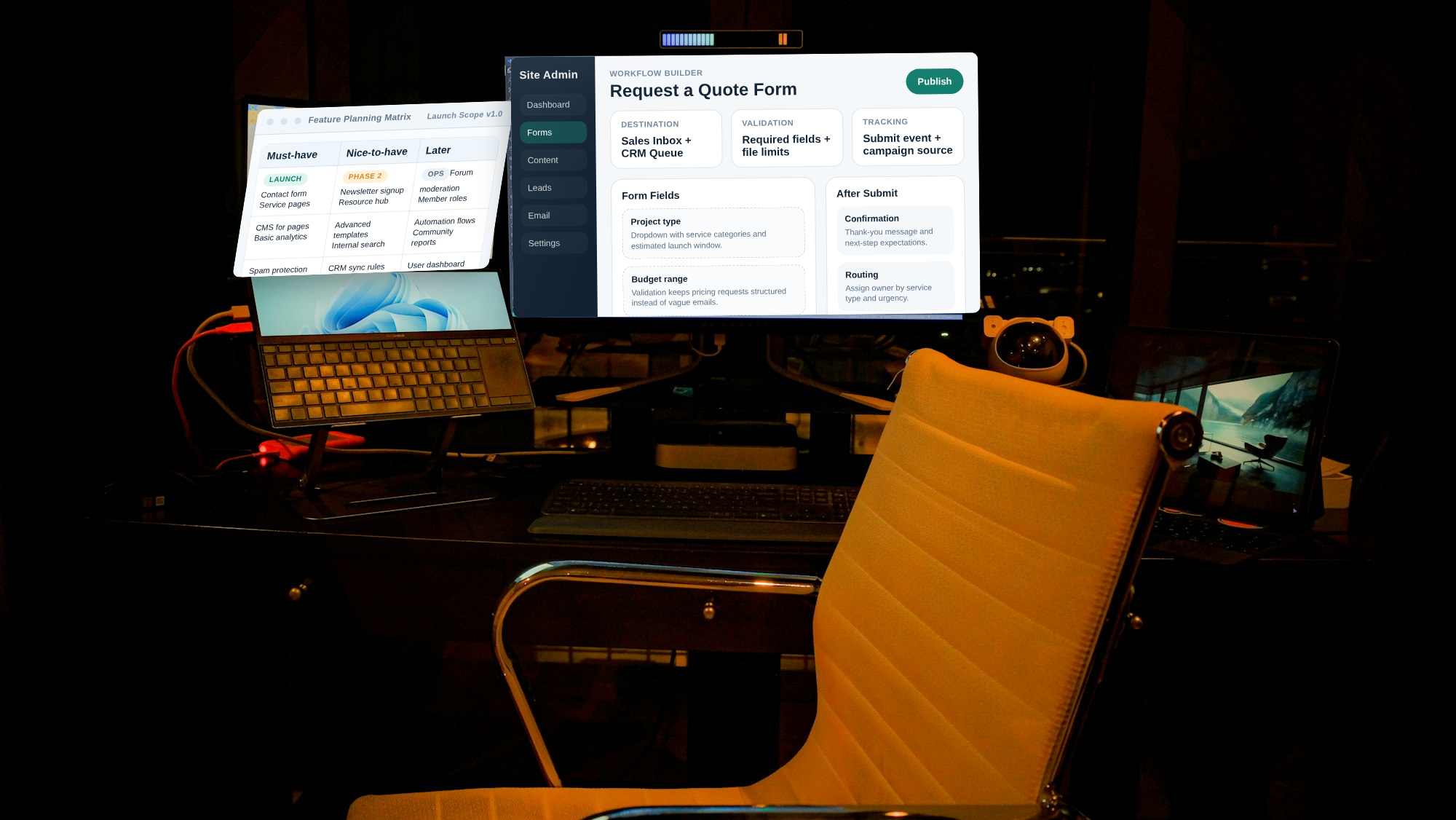
The Decision Framework: Must-have, Nice-to-have, Later
A practical scope starts by classifying features according to what the next phase must accomplish, not what the team might eventually admire.
| Bucket | What it means | Typical examples |
|---|---|---|
| Must-have | Required for launch goals in the next phase | Core pages, contact or quote form, analytics basics, content editing for active pages |
| Nice-to-have | Improves experience but does not block launch outcomes | Newsletter signup, advanced content blocks, internal search for a growing resource area |
| Later | Depends on staffing, data readiness, or integration maturity | Forum, gated community, automation-heavy workflows, complex user dashboards |
The useful rule is blunt: if a feature creates a new operational job, it is rarely a Must-have unless someone already owns that job. A forum without moderation is not community strategy. It is deferred cleanup. A newsletter signup without an editor and sending cadence is not retention. It is a polite box collecting guilt.
Teams often discover that the same request moves between buckets depending on capacity. A simple contact form is usually a Must-have because it directly supports lead capture. A multi-step intake form with conditional logic may still be valuable, but if nobody has finalized the qualifying questions or response process, it becomes Nice-to-have or Later. A forum sounds exciting in a kickoff meeting; once moderation is assigned to an actual person, it often moves to Later with impressive speed.
Answer these before you build:
- Which features are required to support sales or lead handling in the first 30 days?
- Which features depend on content the team has not prepared yet?
- Which features introduce ongoing review, moderation, or list management work?
- Which features can be added later without rebuilding the foundation?
CMS Basics for Non-Technical Teams
A CMS is worth it when the website needs frequent updates by people who are not developers, when multiple content owners are involved, or when the site depends on repeatable templates for articles, case studies, FAQs, service pages, or landing pages. In that situation, the CMS is not just an editor. It is the operating system for publishing.
A CMS can be overkill when updates are rare, content lives on a small number of mostly static pages, and one technically comfortable person can handle changes without friction. If you update the website twice a quarter and every change is structural anyway, a heavy content system may be solving a problem you do not have while creating security and update work you definitely do.
Before choosing a CMS, define:
- Content types: pages, posts, services, FAQs, references, testimonials, downloads.
- Roles and permissions: who can draft, review, publish, and edit live content.
- Workflow: whether content needs approval, scheduled publishing, or revision review.
- Template rules: what stays consistent across entries and what is editable.
This is where many “simple rebuilds” quietly become migration projects. Existing content may have inconsistent headings, duplicate pages, old URLs, poor image naming, or no real taxonomy. If the new site needs cleaner structure, you are not only building a CMS. You are also cleaning a warehouse while it stays open. That affects timeline.
If your business needs a cleaner publishing workflow plus flexible service architecture, that is exactly where structured web design and development planning matters. The visible design is only half the decision; the hidden editing rules matter just as much.
Forms Are Workflow Endpoints, Not Decorative Boxes
“We need a form” is not a build scope. It is the beginning of one.
A simple contact form usually asks for name, email, message, and perhaps phone. A quote or request form often adds service type, budget range, timeline, or file upload. A multi-step intake flow may also branch based on answers, qualify leads differently, or send requests into a CRM or ticket queue.
The visible fields are only the front layer. The real requirements sit behind them:
- Validation: required fields, email format, file limits, conditional rules, and error states.
- Spam protection: rate limiting, honeypots, CAPTCHA or equivalent controls, and inbox filtering.
- Routing: which inbox, sales owner, support queue, or CRM receives the submission.
- After-submit workflow: confirmation message, autoresponder if needed, internal notification, and response target.
- Tracking: analytics events, thank-you states, and campaign attribution parameters when relevant.
The routing question is usually where weak scopes get exposed. If a quote request lands in a shared inbox, who responds? If the request is incomplete, what triggers follow-up? If the business promises a same-day reply, who monitors that promise? The form is not done when the submit button works. It is done when the post-submit path is defined.
For businesses using campaigns, forms also need to preserve attribution cleanly enough that someone can tell which source, landing page, or ad group produced the inquiry. That does not require an overly theatrical analytics stack, but it does require planning. If your lead capture is connected to paid traffic, the measurement conversation should happen alongside the broader online advertising strategy, not three weeks after launch when everyone starts guessing.
Ownership rule: assign one person to form performance. Someone should test submissions monthly, review spam patterns, and confirm that messages still reach the right inbox. Broken forms are often discovered by silence, which is a terrible monitoring system.
Email Lists and Newsletters: Useful, but They Create a Monthly Job
Email features tend to arrive in meetings as if they were a harmless checkbox. In practice, there are at least two different systems hiding inside the phrase “email setup.”
- Transactional email: form confirmations, password resets, account notices, or booking acknowledgments.
- Marketing email: newsletters, updates, campaigns, promotions, or educational sequences.
These should not be scoped as the same thing. Transactional email needs reliable delivery and simple templating. Marketing email needs opt-in planning, list hygiene, sending cadence, unsubscribe handling, and content ownership.
If you are considering newsletter signup, decide this before launch:
- Where signups appear: footer, blog posts, quote forms, dedicated landing pages, or gated content.
- What the user is signing up for: updates, monthly articles, offers, event notices, or product news.
- How consent language is reviewed and who approves it.
- Whether double opt-in is worth using for list quality.
- Who writes, approves, and sends the actual newsletter.
A newsletter signup form may be a Nice-to-have in phase one because it supports future engagement. The actual newsletter operation is an ongoing responsibility that needs time every month. If nobody owns content production, bounce cleanup, unsubscribe review, and schedule discipline, you do not have an email channel yet. You have an ambition with a form field.
This is also a place where custom workflow decisions matter. If signups, content approvals, and internal review processes are more involved than a standard site build can comfortably handle, that may justify deeper custom web development services instead of forcing bespoke operations into a template that was built for lighter use.
Forums and Community Features: When They Make Sense, and When They Do Not
A forum is a job, not a widget.
Forums make sense when there is a real recurring conversation to host, enough user interest to keep threads alive, and a moderation plan with named owners. They can work well for support-heavy products, education programs, associations, or communities with repeatable questions and strong member identity.
They are overkill when expected activity is low, moderation capacity is unclear, or the actual need is simpler than “community.” Many businesses asking for a forum really need one of these instead:
- A better FAQ section.
- A stronger quote or support request form.
- A lightweight feedback or comment process.
- A small member update area, not a public discussion system.
If you do build a forum or community space, scope it like an operations tool:
- User roles: member, moderator, editor, administrator.
- Moderation tools: approval queues, flags, bans, rate limits, spam filters.
- Escalation flow: what happens when a post is abusive, incorrect, risky, or legally sensitive.
- Guidelines: what users can post, what gets removed, and how disputes are handled.
- Coverage: who watches nights, weekends, or high-traffic periods if the forum is public.
Ownership angle again, because it matters: if moderation is “the team” or “we will all keep an eye on it,” moderation is currently nobody’s job. That is not a staffing plan. It is a future incident report.
A phased alternative is usually safer: launch with robust FAQs, structured support forms, and content that answers recurring questions. If activity proves demand, add a lightweight community layer later. The reader gets support earlier, and the business avoids building an empty plaza.
Search and Navigation: Structure Before Search Boxes
Navigation is not a cosmetic layer. It is the public interface to your content model.
Before adding internal search, make sure the site’s categories, page hierarchy, service naming, and internal links make sense. Good structure helps visitors find what they need and gives search engines clearer signals about page relationships. No fireworks required. Just consistent labels, sensible URLs, and content grouped by intent.
Internal search becomes worth it when the site has enough articles, FAQs, products, or documents that browsing stops being efficient. For a five-page brochure site, search is usually unnecessary. For a growing resource center or documentation area, it can become a quality-of-use feature quickly.
Plan these parts early:
- Taxonomy: categories, tags, resource types, service groupings.
- URL logic: clean slugs and stable paths that can survive future additions.
- Internal linking: related services, next-step pages, and article-to-service connections.
- Search scope: whether search should index blog posts only, FAQs only, or the whole site.
If you want to see how a clean structure turns into a public-facing result, the site’s references and portfolio are a useful reminder that the page architecture eventually becomes a visitor experience, not just a sitemap document.
Integrations Checklist: Document the Data Flow Early
Integrations rarely look large in a proposal, but they are where rework likes to hide. The safer approach is to map the data flow before build work starts in earnest.
| Integration | What it handles | What to define early |
|---|---|---|
| Email delivery | Transactional confirmations and notifications | Sender identity, inbox destination, failure handling |
| Analytics | Visits, events, conversions, content performance | Which actions count, how they are named, who reads reports |
| CRM or ticketing | Lead routing, follow-up, case ownership | Required fields, record creation rules, assignment logic |
| Ad tracking | Campaign attribution and conversion review | UTM handling, landing page alignment, conversion definitions |
Documenting the data flow does not need enterprise theater. A one-page scope note is enough if it clearly states what data is collected, where it goes, and who uses it. That single page prevents a surprising amount of confusion later, especially when a site owner assumes “the form is connected” and the developer assumes “that integration is phase two.”
Foundational infrastructure choices matter here too. Hosting environment, domain setup, email sending configuration, and DNS records all influence whether forms, newsletters, and tracking behave reliably. That is why feature planning often overlaps with hosting and domain guidance earlier than most teams expect.
Timeline and Support Planning: MVP First, Enhancements Second
The cleanest way to avoid overbuilding is to phase the work according to operational readiness.
| Phase | What ships | Why it belongs there |
|---|---|---|
| Phase 1: MVP | Core pages, service positioning, contact or quote form, analytics basics, essential content publishing | Supports launch, lead capture, and day-one editing without unnecessary complexity |
| Phase 2: Enhancements | Newsletter signup, richer content templates, search, expanded FAQs, tighter reporting | Adds efficiency once core workflows are stable and owned |
| Phase 3: Community or automation | Forum, member workflows, complex routing, deeper integrations, advanced automation | Belongs later because it depends on staffing, data quality, and proven demand |
What typically takes longer than clients expect?
- CMS setup and migration: because content cleanup, redirects, and templates are never as finished as everyone hopes.
- Form workflows: because validation, routing, and response ownership need decisions, not just styling.
- Email configuration: because sender setup, opt-in flow, and content responsibility have to be aligned.
- Forum readiness: because moderation policy and user-role planning are operational work.
Support planning should be written into the scope, not treated as a sentimental future wish. Decide who updates content, who monitors form submissions, who reviews plugin or CMS updates, and what monthly cadence exists for testing, small improvements, and cleanup. A good system changes behavior because it makes the right action easier than the wrong one. That applies to the internal team as much as the public interface.
Build the Workflow Before You Build the Wishlist
The most expensive website features are often the ones that looked harmless in planning. Not because the code is impossible, but because the maintenance was never priced into the decision.
If you treat each feature as a workflow with an owner, the scope gets clearer fast. The CMS supports publishing. Forms support lead handling. Newsletters support repeat engagement. Forums support community, if you actually have the community operations to sustain them. Once those roles are visible, the roadmap usually writes itself: launch the pages and lead capture first, then add richer publishing, then add the heavier systems only when the team is ready for them.
If you want to turn a vague feature list into a working build scope, we can help with a workflow audit, feature-to-scope mapping session, and phased delivery plan. That means deciding what should ship now, what should wait, and what support the site will need after launch. It is less glamorous than saying yes to every feature request. It is also how useful websites get built.