
Structured data can absolutely help a small business website, but only when it is describing something real. If the page is thin, confusing, or trying to cosplay as ten different page types at once, schema markup will not rescue it. It will just make your technical SEO look busier.
Most people looking into this topic are really asking a cluster of smaller questions. What is structured data in plain English? Will it improve rankings or just change how a result appears? Which schema types actually matter for a service business? And is this something you should add now, or something to save for the “after the website stops being on fire” phase?
For broader planning context, teams can compare guidance from Google Search Central before choosing a workflow.
The short answer is that structured data is a way of labeling page information so search engines can understand the role of that information more clearly. It can support eligibility for richer search features and help search engines interpret entities like a business, product, breadcrumb trail, event, or FAQ. It does not replace useful content, clean page structure, or a website people can actually use without making the sighing noise normally reserved for flat-pack furniture.
In this guide, I’ll give you the plain version first, then a decision framework: when structured data is worth adding, when it is mostly a distraction, how to choose one to three schema types for a small business site, how to implement them with low drama, and how to validate and maintain the markup without turning your CMS into a science project.

What Is Structured Data, Exactly?
Structured data is machine-readable information added to a page so search engines can understand the page’s entities and relationships more precisely. The most common format you’ll see on modern sites is JSON-LD, which is a block of code that sits in the page and describes the page in a structured way.
Related implementation details are also covered in WordPress documentation, which helps keep tool decisions grounded in established practices.
If that sounds abstract, here is the plain version. A normal page says, “We offer web design, hosting help, and online advertising support.” Structured data adds labels that say, “This is a business. This is a service page. This is the website URL. These are breadcrumbs. These questions and answers belong together.” It gives search engines cleaner context.
That context can matter because search engines do not just index words. They try to understand what the page is, who it is about, and whether the information fits specific search features. That is why structured data is best thought of as clarification markup, not as a ranking cheat code.
Key terms worth knowing
| Term | Plain-English meaning | Why it matters |
|---|---|---|
| Schema markup | A structured vocabulary used to label the meaning of page elements. | It is the overall language behind many structured-data implementations. |
| JSON-LD | A script format that lets you place structured data in one block. | It is often the easiest format to manage on a small business site. |
| Rich results | Enhanced search appearances such as FAQ results, breadcrumb trails, product details, or other supported result types. | These features can improve how a result is presented, but they are not guaranteed. |
| Validation | Testing whether the markup is readable and complete. | It helps you catch errors before they sit quietly on the site like a broken smoke alarm battery. |
Common Misconception: Structured Data Does Not Replace Content Quality
This is the part that saves people time. Structured data can support SEO, but it cannot make a weak page strong. If the visible page content is thin, duplicated, vague, or misaligned with what the page claims to offer, markup will not fix the underlying problem.
Think of it this way. Content is the actual conversation with the visitor. Structured data is the label on the file folder. A good label helps people find the file and understand what is inside. It does not magically make the document inside more persuasive, complete, or trustworthy.
That is why pages like the web design services overview or the references page still need strong visible headings, useful copy, and a clear reason to trust the business. Schema can support those pages. It cannot substitute for them.
It also helps to separate three ideas that often get blurred together:
- Search understanding: structured data can improve how clearly the page is interpreted.
- Search appearance: some markup can make a page eligible for enhanced result features.
- Search performance: actual clicks and leads still depend on query intent, competition, relevance, page quality, and conversion experience.
So if your page currently says almost nothing useful and loads like it is walking uphill in wet shoes, the first fix is the page itself. Structured data belongs after the page can already stand on its own.
When Structured Data Is Worth Adding
Here is the practical rule: add structured data when it helps search engines understand information the page genuinely contains and when that information maps to supported schema types. A few common small-business cases make sense quickly.
1. Local services and organization details
If the site represents a real business offering services, business-level schema can help clarify the organization, website, and sometimes the local-service context. This is often useful on the homepage and contact-oriented sections. For a business offering web design, hosting guidance, and SEO support, that basic entity clarity can reinforce what the site is actually about.
That does not mean inventing location details you do not have. It means describing real information that is already visible on the site, such as the business name, website, service pages, and contact paths. If your site also needs broader structural cleanup, the groundwork usually starts with the homepage and the key service pages before you worry about more ambitious schema types.
2. Product listings or packaged offers
If you sell clearly defined products or product-like packages, product schema can make sense. This matters more for ecommerce or fixed offers than for broad service pages. A general “we do digital marketing” page is not the same thing as a product listing with clear attributes.
3. Events, webinars, or scheduled launches
If you promote events with dates, times, and locations, event schema is often worth the effort. This is one of the cleaner use cases because the page content usually maps naturally to the markup fields.
4. FAQ blocks with real answers
If a page already includes real questions and answers that help visitors understand a service, FAQ markup may be appropriate. The important phrase there is already includes. Do not bolt on fake FAQs because someone on the internet said every page needs them. That is how pages become longer without becoming better.
5. Breadcrumbs and site structure
Breadcrumb schema is often a low-risk win on sites with multiple sections. It helps reinforce the relationship between the homepage, category or service pages, and deeper resources. On a service site, that can support clearer navigation between areas like hosting and domain guidance and online advertising support.
When It Usually Is Not Worth the Effort
There are also situations where structured data is technically possible but strategically unhelpful. This is where a little restraint saves a lot of cleanup.
Thin or low-quality pages
If the visible page has very little substance, focus on content and usability first. Markup on a weak page is like adding a neat label to an empty box. It is tidy, but it does not change the fact that there is not much inside.
Duplicate pages or overlapping intent
If two pages say nearly the same thing, structured data does not solve the duplication problem. You still need a clear primary page and a cleaner internal structure. This is the same logic you see in broader launch SEO work: indexability and page clarity come before extra enhancements.
Unsupported or forced use cases
If the page is not a product, event, FAQ, recipe, or local-business page in any meaningful way, do not force it. Search engines are not impressed when a page claims to be three things at once. They are more likely to ignore the markup or flag issues.
Pages that change constantly without maintenance
Outdated structured data is worse than missing structured data. If you cannot keep hours, offers, product status, or contact details current, keep the markup simple until your content workflow is more reliable.
A Practical Selection Guide: Choose One to Three Schema Types
Small business sites rarely need a schema buffet. In most cases, one to three well-matched types are enough. The trick is to match the markup to the site’s goals and real page inventory.
| Site goal | Good starting schema choices | Why these fit |
|---|---|---|
| Local service lead generation | Organization or LocalBusiness, BreadcrumbList | These help define the business entity and site structure without overreaching. |
| Service pages with real Q&A blocks | BreadcrumbList, FAQPage where appropriate | Useful when the questions are already on the page and genuinely helpful. |
| Product or package pages | Product plus BreadcrumbList | Good for clearly defined offers with visible details on the page. |
| Event promotion | Event | Works well when the page includes real schedule, location, and attendance details. |
For a site like this one, a conservative and useful starting set would often be:
- Organization or LocalBusiness for the site-level entity.
- BreadcrumbList for clearer page relationships.
- FAQPage only on pages that already contain legitimate FAQ sections.
That is enough to create clarity without adding markup that later needs babysitting. If you are still planning the site structure itself, the earlier question is usually not “Which schema type?” but “Which pages do we actually need?” That is where a planning piece like choosing the right CMS, forms, and site features becomes more useful than adding extra code to uncertain pages.
Implementation Options: CMS Plugin vs. Manual JSON-LD
There are two practical ways most small businesses handle structured data: use a plugin or module inside the CMS, or add the JSON-LD manually.
CMS plugin or built-in SEO module
Best for: site owners who want a faster setup and predictable fields.
The upside is convenience. A plugin can handle common schema types, keep the markup tied to page templates, and reduce the chance of syntax mistakes. The downside is that plugins sometimes add too much, use defaults you forgot to review, or make it harder to see exactly what is being output.
Manual JSON-LD
Best for: sites that need tighter control or custom page-level logic.
The upside is precision. You can keep the markup short, deliberate, and matched to the real page content. The downside is that someone has to maintain it, which means future edits need to update both the visible page and the markup block when relevant details change.
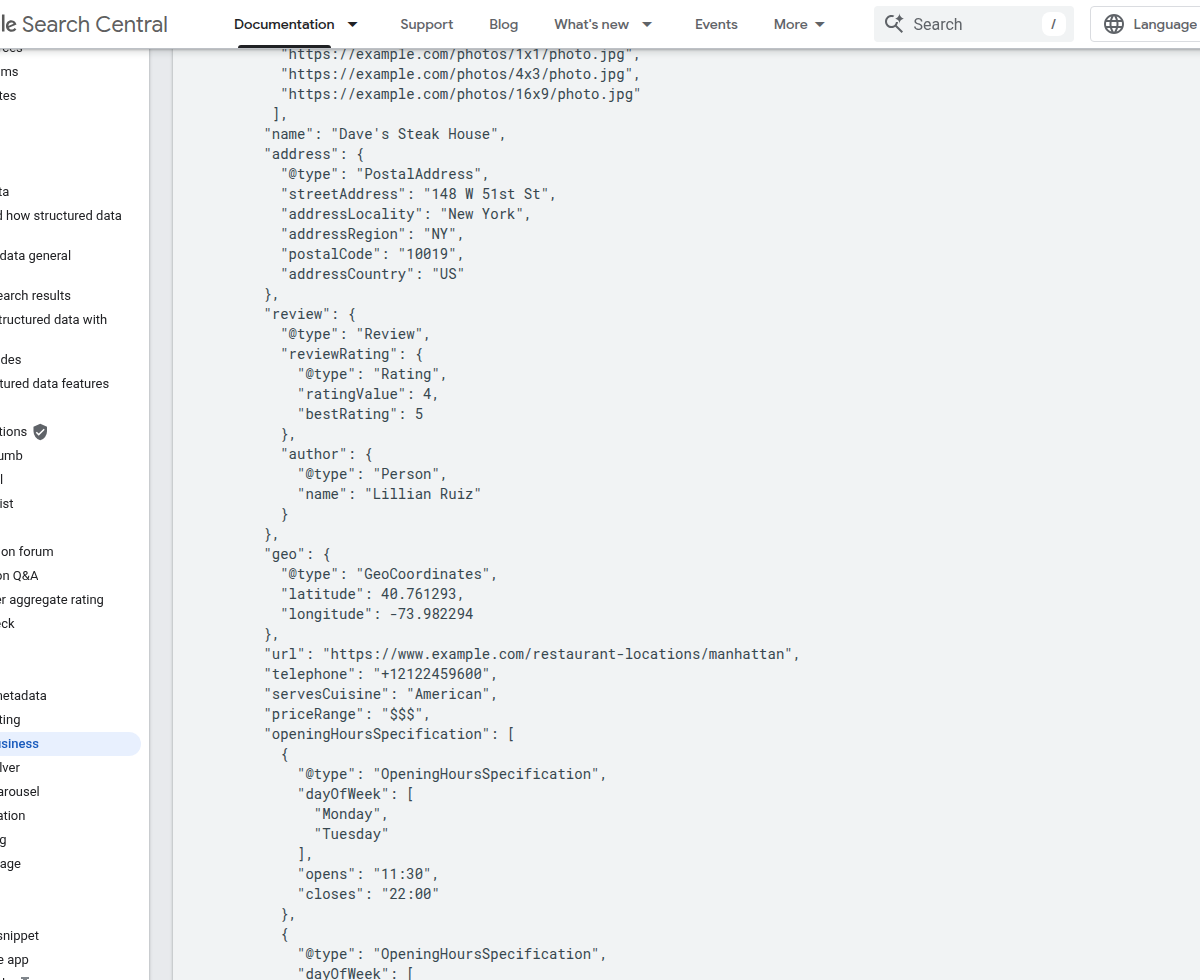
Which approach is better? Usually the one your team can maintain reliably. If you are already improving the site templates or service-page structure, it may make sense to fold markup into broader web design and site maintenance work. If you are operating on a simple CMS setup, a reputable plugin plus a careful validation habit may be the lower-risk path.
And if your broader site conversation is drifting toward modern builders and template-driven workflows, a neutral useful resource here is this comparison of AI web builders and website templates. It is not a structured-data guide, but it is relevant when you are deciding how much site logic and markup control you want inside your build process.
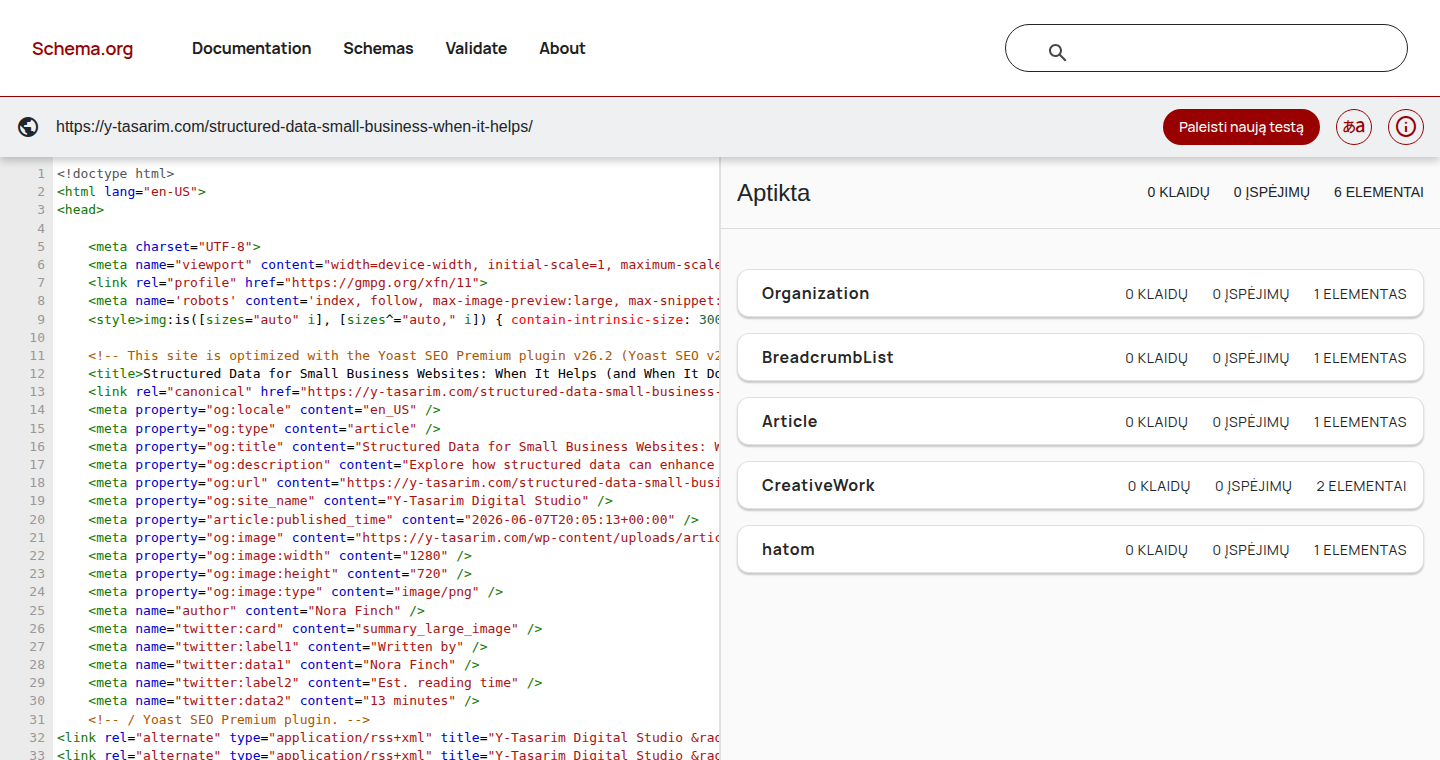
Validation Workflow: Test, Fix, Re-Test
This is the part people skip, and it is the part that turns markup from “technically present” into “actually useful.” A simple validation workflow is enough.
- Test the live URL. Validate the page after the markup is on the live page or a live-like staging page.
- Check which items were detected. Confirm the tool sees the schema type you intended.
- Fix critical errors first. Missing required fields or malformed JSON matter more than optional warnings.
- Review warnings with judgment. Some warnings are worth fixing. Some are optional depending on the page type.
- Re-test after edits. A second pass catches syntax errors and accidental mismatches.
A practical mini-checklist helps here:
- Does the schema type match the actual page?
- Are the business name, URL, contact details, and service details consistent with the visible content?
- Do the linked URLs resolve correctly?
- Did the tool detect the expected item?
- Have you documented where this markup lives, so future edits do not orphan it?
If the page is brand new, it also helps to keep validation connected to normal launch SEO. Structured data is one more quality check in the same workflow that covers indexing, internal linking, and page purpose. It should not live on an island, holding a tiny flag and demanding its own parade.
Common Mistakes to Avoid
Most schema problems are not exotic. They are ordinary process mistakes wearing a technical hat.
Using the wrong page type
If a page is a general service page, do not mark it up like a product catalog or event page just because a plugin lets you. The first question should always be, “What is this page really?”
Missing required fields
Incomplete markup is common when someone adds a schema type quickly and assumes the defaults are fine. Validation catches this. That is why the workflow matters.
Letting visible content and markup drift apart
If the page says one thing and the markup says another, trust breaks down. This often happens when hours, service details, offers, or page copy change and nobody updates the structured data.
Adding FAQ markup to weak filler content
FAQ blocks should help users, not pad the page. If the questions are generic and the answers are one sentence of fog, the page is not improved. It is just longer.
Trying to mark up everything
A lot of small businesses would be better served by clean schema on five important pages than scattered schema on thirty mediocre ones. Depth beats sprawl here.
Ongoing Maintenance Checklist
Once the markup is live, maintenance becomes simple if you attach it to normal content updates.
- Update business details when service areas, hours, contact URLs, or key offerings change.
- Re-test after major page edits, especially template changes or plugin updates.
- Review markup when launching new sections so breadcrumbs and internal structure stay aligned.
- Audit high-intent pages quarterly to make sure schema still matches what the page says today.
- Keep expectations realistic: schema supports clarity and eligibility, but it does not guarantee rich results or rankings.
If your visibility plan includes both SEO improvements and paid traffic, remember that structured data is still only one part of the puzzle. It complements content, technical hygiene, and page quality. It does not replace the broader work behind a service site or campaigns like online advertising and AdWords support.
Final Take: Use Structured Data Where It Clarifies Real Pages
Structured data helps most when it describes something real, on a page that is already worth visiting. For a small business website, that usually means starting small: pick one to three schema types, match them to your actual pages, validate them carefully, and keep them maintained.
If your site is still sorting out page structure, content priorities, or technical hosting basics, solve those first. The work around hosting, domain setup, and site stability still matters because search engines cannot benefit from beautifully labeled markup on a page that is broken, blocked, or out of date.
The next useful question is not “Should I add schema everywhere?” It is “Which important page would become clearer if I labeled it properly?” Start there. Keep it small. Validate it. Then move on to the next real improvement.